
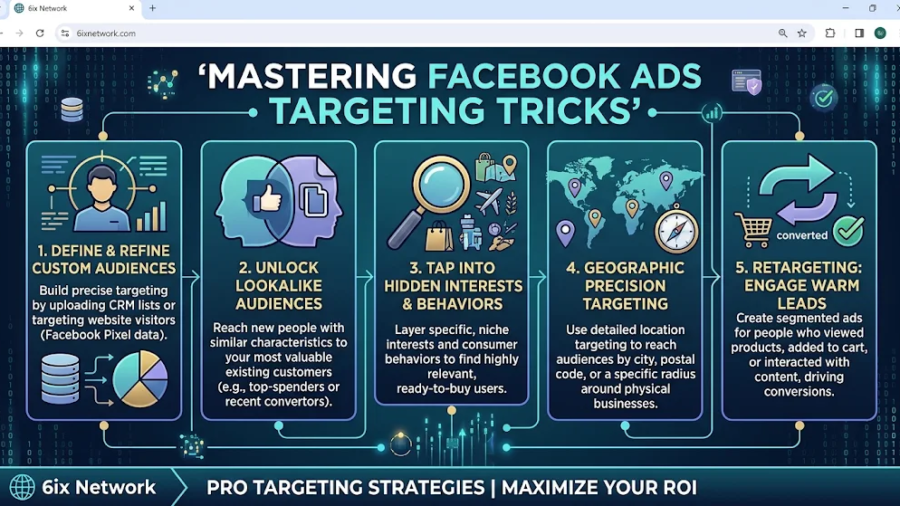
Picture a leaky bucket under a running tap. The tap is your ad budget, and the bucket is your sales pipeline. Most advertisers respond to a weak month by pouring in more water, when the real fix is finding the holes. In Facebook advertising, those holes are almost always targeting problems: the wrong people seeing your ads, the right people seeing them too often, or your own customers being charged to you twice. This guide covers seven targeting fixes that work under Meta’s current rules, built on 2026 data rather than tutorials from 2021.
Why Your Facebook Ad Budget Keeps Leaking
Most advertisers blame the creative first. They swap an image, rewrite a headline, relaunch, and watch the spend continue while the results stay flat. The more common culprit is audience misalignment, where the algorithm spends your money efficiently on people who were never going to buy. Meta’s delivery system defaults to broad reach when you give it room, and without the right signals and exclusions it will happily take that room. The money doesn’t vanish in one dramatic crash you can spot in Ads Manager. It trickles away through small, unchecked decisions, and by the time CPMs spike, weeks of compounding cost have already built up. Understanding where the trickle starts means understanding what Facebook ads cost today and how much control you actually have left over who sees them.
What Facebook Ads Really Cost Right Now
Benchmarks give you a reality check before you start tinkering. WordStream and LocaliQ’s 2026 figures put the average traffic-campaign CTR at 1.93% with CPC around $0.60, while lead campaigns average $27.39 per lead at an 8.54% conversion rate. Those numbers look friendly, but they hide a squeeze. One 2025 analysis found that CPM rose about 20% year over year, from $11.82 to $14.19, while CPA edged up to $38.19. Reach is getting pricier, so every wasted impression hurts more than it used to. Here’s the arithmetic that should make you wince: if CPC climbs 10% and your conversion rate stays flat, your cost to acquire a customer climbs 10% too. You don’t need a disaster to lose money. A slow drift is enough. Treat these averages as a starting line rather than a verdict, since they shift by industry, objective, and creative format, and your own account history is the benchmark that matters most. Compare your cost per result against your profit per customer, not against a blog post. Facebook Ads Statistics 2026: Benchmarks by Objective, Industry and Format +2
How Meta’s Targeting Changes Moved the Goalposts
If your Facebook playbook dates from a few years back, parts of it no longer work. Meta began consolidating detailed targeting options on June 23, 2025 in Ads Manager, and pulled dozens of detailed-interest categories out of the system in January 2026. The bigger shift is philosophical. In 2026, inputs split into hard controls (location, languages, minimum age, exclusions, Special Ad Category) and audience suggestions (age, gender, detailed targeting, custom and lookalike audiences). Suggestions steer the AI without binding it, so your ads can land in front of people outside your defined audience when the system predicts a better result. Apple’s App Tracking Transparency and Meta’s own category removals also cut the third-party data that once powered precise interest targeting. The old craft of stacking interests like Lego bricks has faded. The new craft is knowing which levers still pull hard, which ones only whisper, and how to feed the machine good signals. The seven tricks below are built around exactly that distinction.
Trick 1: Treat Interests as Hints, Not Fences
The first mistake is still treating interest targeting as a locked gate. It’s closer to a signpost. Meta now describes added detailed targeting options as audience suggestions by default, meaning ads go to people matching your suggestion plus other audiences when the system expects better performance. If you pick “interior design” and “home renovation” expecting a tight circle of hobbyists, you’ll be disappointed to find your ads wandering outside it. The practical response is to stop agonizing over clever interest combinations and instead use them to give the algorithm a head start, especially when your account has little conversion data. If conversion volume is low, detailed targeting or Custom Audiences are the more reliable starting points while you build data. Once you have steady conversions, the broader Advantage+ Audience usually has enough signal to find buyers by itself. The evidence for going fully broad isn’t absolute, though. In one 30-day split test, Advantage+ Audience produced more registrations than detailed targeting and lookalikes, yet its lead over detailed targeting wasn’t statistically significant. The lesson is to test both in your own account rather than trusting any guru’s blanket rule. Use interests when you’re new and data is thin, then loosen your grip as the pixel learns.
Trick 2: Use Custom Audience Exclusions Like a Bouncer
Here’s the trick nobody mentions because it sounds boring: telling Meta who not to show your ads to. Detailed targeting exclusions have been removed, which is why many advertisers believe exclusions are dead. They aren’t. Custom Audience exclusions are still available, letting you exclude groups you can identify through your own data, such as existing customers. Jon Loomer, one of the most cited independent Meta educators, notes that Meta treats a custom audience exclusion as a tight constraint, though he also warns they are imperfect, so you’ll still reach some of those people anyway. Think of it as a bouncer who’s good but not perfect. Meta has also added “exclusion-only” custom audiences designed to keep specific people, such as employees, from seeing acquisition ads. If your prospecting campaign is paying to reach people who already bought last week, you’re paying to introduce yourself to old friends. One e-commerce case claimed that 42% of a brand’s paid social spend was reaching people who were already customers. That figure comes from a vendor, so take it with salt, but the direction of the problem is real for almost any business with a customer list.
Who Deserves a Spot on Your Exclusion List
Start with recent purchasers, since few things burn money faster than prospecting ads served to someone who bought yesterday. Add your current clients if you run a service business, because they’ve already said yes and need a different message entirely. Include recent leads who are mid-conversation with your sales team; showing them cold prospecting ads can feel awkward and wasteful. Staff and their families, who tend to click around out of curiosity, belong on the list as well, and the exclusion-only audience type exists for precisely that purpose. Be selective rather than exhaustive. Loomer’s advice is to limit exclusions to situations where they make the most sense to avoid wasted spend. Excluding too much shrinks the pool the algorithm learns from, so match the window to your buying cycle: a short window for impulse purchases, a longer one for high-ticket services where customers rarely return quickly. Refresh these lists regularly, because a stale exclusion list is almost as bad as having none.
Trick 3: Seed Lookalikes With Your Best Customers, Not Your Biggest List
Lookalike audiences are only as smart as the data you feed them. Meta’s system studies the people in your source audience and hunts for similar people elsewhere, which means a sloppy seed produces sloppy results. Uploading every email you’ve ever collected tells Meta to find more people like your tire-kickers, discount hunters, and one-time buyers. Instead, build your seed from the people you’d clone if you could. One audience-targeting guide ranks the top 20% of customers by lifetime value as the highest-signal seed, and another explains that value-based lookalikes seeded from high-LTV customers improve prospecting ROAS for stores with variable customer value. Service businesses can apply the same thinking by seeding from clients who paid the most, stayed the longest, or referred others. Best-practice checklists also recommend you start with the strongest possible source audience, refresh the source data regularly, and exclude converters from prospecting campaigns. Quality beats quantity here, every time. A tight list of 1,000 genuinely great customers will usually outperform a bloated list of 20,000 mixed ones.
Why Smaller Lookalikes Usually Win
Reach tempts you to go big, and it’s a trap. Practitioners advise that lookalikes work best with a smaller pool, since the bigger a lookalike gets, the broader it may become. A 1% lookalike represents the people most statistically similar to your seed, while a 10% lookalike drifts toward “vaguely resembles someone who might like this.” Another guide makes the trade explicit: a 1% lookalike is smaller than a 5% or 10% one, but the match quality is significantly higher, which matters more than reach when you’re eliminating wasted spend. Start at 1%, watch your cost per result for a couple of weeks, and only then test 2% to 3% if you need more volume. Scale in steps rather than jumps. Also confirm your pixel is firing correctly before building anything, because a lookalike built on broken event data is a photocopy of a smudge. Check Events Manager first, then build, then wait while the audience populates before judging performance. seoworksadstellar
Trick 4: Hunt Down Audience Overlap Before It Hunts Your Budget
Audience overlap is the silent budget killer. When several ad sets target the same people, you end up competing against yourself in the auction, which inflates your costs and shrinks your unique reach. It’s like sending three salespeople to knock on the same door on the same afternoon. The homeowner gets annoyed, and you pay three commissions. One analysis of an account found that the ad sets with the highest overlap paid 79% more per registration than a retargeting ad set with clean audience boundaries. That’s a single case rather than a universal rule, but it shows how fast the damage can compound. Meta ships a free tool for this: the Audience Overlap tool in Ads Manager visualizes which saved or custom audiences are targeting the same users, giving you overlap percentages for each pair. Check it monthly if you run multiple ad sets. The cleaner fix is structural: keep prospecting and retargeting separate, exclude retargeting pools from prospecting, and consolidate ad sets that target nearly the same crowd. Fewer, healthier ad sets learn faster and spend smarter than a dozen anemic ones splitting a small budget.
Trick 5: Let Your Creative Do the Targeting
Here’s the idea that feels strange until it clicks: in 2026, your ad itself is your most powerful targeting tool. With interest categories pruned and Advantage+ in charge, the variable that moves who sees an ad has shifted from audience selection to the ad itself. The Meta system reads your creative, works out who engages with it, and routes it toward similar people. A video that opens with “Lagos homeowners tired of renovation delays” attracts a different crowd than one that opens with a generic lifestyle montage. Specific beats generic. The same insight applies to formats and hooks, since native-style content that blends into the feed tends to win. Industry guidance for 2026 also stresses that creative diversity and speed matter more than polish, so feed the algorithm several distinct angles instead of one lovingly produced masterpiece. Each angle repels some people and attracts others, which is exactly how targeting happens now. Write ads that speak to one clear buyer, name their problem in the first line, and let the wrong people scroll past for free. The people who scroll past never cost you a click.
Trick 6: Lock Down Location and Placements
Advantage+ is eager to find opportunities, and sometimes it finds them in places you never wanted. A June 2026 guide flags that over-expansion is one of the most common Advantage+ issues, because the system pushes ads beyond your intended audience, with location targeting as a key example. If you sell only in Lagos and Abuja, any impressions served elsewhere are money gone. Location, language, and minimum age are among the hard controls Meta still respects, so use them with confidence. Check your location setting carefully: choose people living in or recently in the area rather than any broader option, and read the breakdown report to confirm where impressions land. Placements deserve the same scrutiny. Some placements deliver cheap clicks from accidental taps, which look wonderful in the dashboard and produce nothing at the till. Pull a placement breakdown, compare cost per real conversion rather than cost per click, and cut the worst performers. One practical setup recommended for testing is running one ad set with Advantage+ Audience, broad targeting, and strong exclusions beside another ad set with original audiences and more constrained demographics. Let the numbers pick the winner. seoworksadmanage
Trick 7: Fix Your Signal Quality Before Touching the Audience
Here’s the trick that most targeting articles skip entirely. Meta’s algorithm learns from the conversion data you send back, so bad data means bad targeting, no matter how clever your audience setup looks. If your pixel misfires, your events duplicate, or your Conversions API isn’t connected, the machine is learning from fog. A wasted-spend guide recommends checking cost per result first, then CTR and frequency together, and finally Event Match Quality to make sure the whole system isn’t being trained on weak data. That order makes sense because high frequency alone proves nothing, but frequency paired with weak CTR tells you an audience has been exhausted. Bidding discipline matters here too. Practitioners suggest starting with Lowest Cost while you gather at least 50 conversions per week, then moving to Cost Cap once you know your profitable CPA. If your account sees only a trickle of conversions, optimize for a higher-funnel event until volume builds. Before you touch the audience, test your events, confirm deduplication, and make sure your tracking reflects real sales rather than vanity actions.
The Seven Tricks Side by Side
Seeing the tricks in one place helps you decide where to start. The table below ranks them by typical effort and by the kind of waste each one cures, so you can triage your account quickly instead of trying to do everything on the same Monday. Treat the impact column as a rule of thumb rather than a promise, because every account leaks in a different place.
| Trick | What It Fixes | Effort | Best Starting Point |
|---|---|---|---|
| 1. Interests as hints | Over-trusting narrow interest stacks | Low | New accounts with little data |
| 2. Custom audience exclusions | Paying to reach existing buyers | Low | Any account with a customer list |
| 3. High-value lookalike seeds | Cloning low-quality customers | Medium | Accounts with 1,000+ quality customers |
| 4. Overlap checks | Ad sets competing with each other | Low | Accounts running 3+ ad sets |
| 5. Creative as targeting | Generic ads attracting the wrong crowd | Medium | Accounts with stable conversion data |
| 6. Location and placements | Impressions outside your market | Low | Local or regional businesses |
| 7. Signal quality | Algorithm learning from bad data | Medium | Every account, before scaling |
A Simple 30-Day Plan to Stop the Bleeding
Knowing the tricks and applying them are different things, so here’s a plan that fits inside a month without wrecking your live campaigns. The goal is to fix the cheapest, fastest leaks first, then use the savings to test bolder ideas. Resist the temptation to change everything at once, because simultaneous edits make it impossible to tell which change helped. Make one or two changes per week, record your cost per result before and after, and give each change enough time to gather data. Most Facebook campaigns need several days and a few dozen conversions before a verdict means anything, so patience is part of the strategy rather than a sign of indecision. Keep a simple log with the date, the change, and the result. That log becomes your own private benchmark, which will tell you more than any industry average ever could.
Weeks 1 and 2: Audit and Clean
Begin with measurement, since you can’t fix what you haven’t seen. Check Events Manager for pixel and Conversions API health, then pull your ad set breakdowns for location and placement. Run the Audience Overlap tool across your saved and custom audiences and note any pair above a worrying overlap percentage. Build or refresh your exclusion lists: recent buyers, current clients, active leads, and staff. Switch off placements that deliver clicks but no conversions, and tighten your location setting if impressions are leaking outside your market. Consolidate ad sets that target nearly identical crowds. By the end of week two, you should have a cleaner structure, a trustworthy tracking setup, and a baseline cost per result you can compare against. None of this is glamorous, but this stage alone often recovers a surprising share of the budget before you’ve launched anything new.
Weeks 3 and 4: Test and Scale
With the leaks patched, spend the second half of the month on experiments. Build a lookalike from your top customers by lifetime value and launch it at 1% beside your current best prospecting audience. Set up a head-to-head test: one Advantage+ Audience ad set with strong exclusions against one original-audience ad set with tighter demographics. Introduce three or four creative angles that each speak to a different buyer problem, and let delivery reveal which crowd responds. Keep budgets modest at first and scale winners gradually, since sudden jumps can disrupt learning and push costs up. At the end of week four, compare your cost per result, your frequency, and your conversion quality against the week-one baseline. Keep what works, drop what doesn’t, and repeat the cycle monthly. Targeting in 2026 rewards the advertiser who tests steadily, not the one who finds a single magic setting.
Mistakes That Quietly Drain Your Budget
Even with good tactics, a handful of habits keep draining accounts. The first is judging campaigns by click metrics alone. A cheap click means little if it comes from an accidental placement tap or a curious bystander, so always anchor decisions to cost per qualified result. The second is changing settings too often. Every major edit can send an ad set back into the learning phase, so frequent tinkering keeps your campaign permanently half-trained. The third is neglecting retargeting windows. Video viewers who watched most of your content make excellent warm audiences; one guide notes that viewers who watched 75% or more show strong interest and suit middle-funnel campaigns. Letting these warm pools go unused means paying full price to rediscover people who already like you. The fourth is ignoring frequency. When the same people see your ad again and again without converting, that audience is exhausted, and extra spend there isn’t optimization, it’s repetition. The fifth is copying a competitor’s setup without checking your own data. Their audience, margins, and sales cycle differ from yours, so borrow ideas but verify everything against your numbers.
Conclusion
Facebook advertising hasn’t become impossible, but it has become less forgiving of sloppy setups. Meta has trimmed the detailed-targeting menu, turned many inputs into suggestions, and handed more control to automation, which means the levers that remain matter more. Lean on the hard controls you still own: location, exclusions, and clean tracking. Feed the algorithm good signals through high-value lookalike seeds and sharp creative. Watch for overlap and exhausted audiences before they drain the budget. Start with the cheap fixes, measure honestly, and scale only what proves itself against your own profit numbers. Do that consistently, and you’ll spend less time refilling the bucket and more time watching it fill.








Leave a Comment
You must be logged in to post a comment