Buy on Amazon
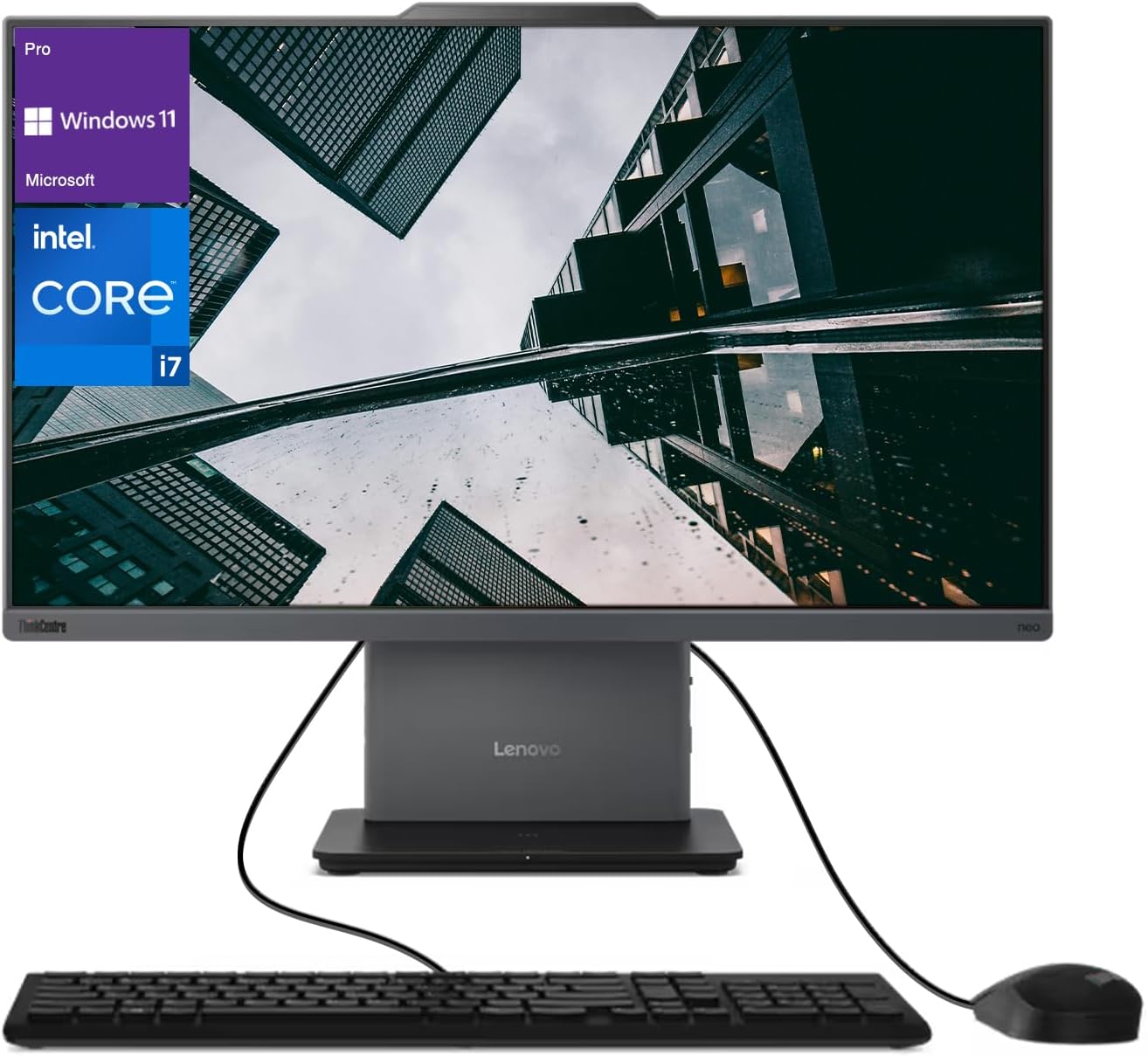
The Lenovo ThinkCentre Neo 50a Business All-in-One combines powerful hardware with enterprise-grade security in a sleek, space-saving design. Featuring a 23.8″ FHD anti-glare display, Intel Core i7-13620H processor, 32GB DDR5 RAM, and 1TB SSD, this premium business computer delivers exceptional performance for demanding professional workloads. With Lenovo’s reputation for reliability, comprehensive security features, and minimal footprint, the Neo 50a represents an ideal solution for modern business environments prioritizing productivity and design.
The demand for powerful, reliable, and secure computing solutions has never been greater. The modern workplace requires systems that not only deliver exceptional performance but also save space, integrate seamlessly into professional environments, and maintain enterprise-grade security standards.
Enter the Lenovo ThinkCentre Neo 50a Business All-in-One, a premium computing solution designed specifically to meet these demands. Combining the processing power of Intel’s 13th-generation Core i7 processor with substantial DDR5 memory, fast SSD storage, and a professional-grade display, this system aims to be the cornerstone of productive business operations.
The ThinkCentre line has long been Lenovo’s flagship business desktop brand, known for reliability, security features, and corporate manageability. The Neo 50a represents the latest evolution of this legacy, incorporating modern components and design philosophy while maintaining the business-focused DNA that has made ThinkCentre a trusted name in professional computing.
In this comprehensive review, we’ll examine every aspect of the Lenovo ThinkCentre Neo 50a Business All-in-One—from performance and design to security features and business value—to determine if it deserves consideration for your professional environment.
Product Information
Technical Specifications
- Processor: Intel Core i7-13620H (10 cores: 6 Performance-cores, 4 Efficient-cores, 16 threads, up to 4.9GHz)
- Memory: 32GB DDR5 RAM (faster and more efficient than previous DDR4 technology)
- Storage: 1TB SSD (NVMe PCIe)
- Display: 23.8″ Full HD (1920 x 1080) Anti-Glare IPS panel
- Graphics: Intel Iris Xe integrated graphics
- Operating System: Windows 11 Pro
- Connectivity:
- Wi-Fi 6E
- Bluetooth 5.1
- Ethernet (1 Gbps)
- Ports:
- Multiple USB Type-A ports (USB 3.2)
- USB Type-C with DisplayPort functionality
- HDMI output
- Ethernet port
- Audio combo jack
- SD card reader
- Security Features:
- TPM 2.0 chip
- Kensington lock slot
- Optional fingerprint reader
- ThinkShield security suite
- Camera: 1080p FHD webcam with privacy shutter
- Audio: Stereo speakers with Dolby Audio
- Dimensions: Approximately 21.3″ x 16.1″ x 8.1″ (with stand)
- Weight: Approximately 15.4 lbs
- Power Supply: 120W or 135W external power adapter (varies by configuration)
Package Contents
- Lenovo ThinkCentre Neo 50a All-in-One Computer
- Wireless keyboard and mouse
- Power adapter and cable
- Documentation and warranty information
- Setup guide
Price Range
The Lenovo ThinkCentre Neo 50a Business All-in-One with the specified configuration (Intel Core i7, 32GB DDR5, 1TB SSD) typically retails in the $1,200 to $1,600 range, depending on the retailer, any ongoing promotions, and additional customization options. Business volume purchasing or Lenovo corporate accounts may qualify for additional discounts.
Design and Build Quality
The Lenovo ThinkCentre Neo 50a exemplifies what a modern business all-in-one should be: professional, understated, and thoughtfully designed. The system features Lenovo’s signature business aesthetic—a matte black finish with subtle branding that blends into any professional environment without drawing unnecessary attention.
The 23.8-inch display is surrounded by relatively thin bezels on three sides, with a slightly thicker bottom bezel bearing the ThinkCentre branding. This design choice maximizes screen real estate while maintaining structural integrity. The anti-glare coating effectively reduces reflections in bright office environments, addressing a common pain point in workplace computing.
The stand design deserves particular attention, offering excellent stability while allowing for tilt adjustment to accommodate different viewing angles and user heights. Some configurations may include a height-adjustable stand option, further enhancing ergonomic flexibility. The stand’s footprint is modest, allowing the system to fit comfortably on smaller desks or in limited workspace environments.
Build quality is exceptional, as expected from Lenovo’s business-class machines. The materials feel solid and durable, with no flexing or creaking during normal adjustments. The system meets various MIL-STD-810H durability tests, indicating resilience to environmental stressors like temperature fluctuations, humidity, and vibration—qualities that are increasingly important as work environments become more diverse.
Port placement demonstrates thoughtful consideration of real-world usage scenarios. Frequently accessed ports are positioned on the side for easy access, while less frequently used connections are placed on the rear to minimize cable clutter. The inclusion of both legacy and modern connection options ensures compatibility with a wide range of peripherals without requiring additional adapters.
Display Quality
The 23.8-inch Full HD (1920 x 1080) IPS display strikes an effective balance between screen real estate and clarity. While not pushing into 4K territory, the resolution is perfectly appropriate for business applications, providing crisp text rendering and adequate space for multitasking without requiring scaling that can sometimes cause interface inconsistencies.
Color accuracy is commendable for a business-focused display, covering approximately 100% of the sRGB color space. This makes the Neo 50a suitable not only for standard office applications but also for light creative work including marketing material development and basic photo editing. The panel’s brightness (typically around 250-300 nits) is sufficient for normal office environments, though users in extremely bright settings may occasionally find themselves wishing for higher maximum brightness.
The anti-glare coating deserves special mention, as it effectively reduces reflections without introducing the graininess that plagues some matte displays. This makes the Neo 50a particularly well-suited to environments with overhead lighting or windows—common scenarios in most business settings.
Viewing angles are excellent thanks to the IPS technology, maintaining color consistency even when viewed from the side. This characteristic is particularly valuable during collaborative sessions when multiple colleagues may be viewing the screen simultaneously.
The display’s 60Hz refresh rate is standard for business applications, providing smooth performance for productivity tasks while conserving power compared to higher refresh rate panels.
Performance Analysis
At the heart of the ThinkCentre Neo 50a is Intel’s Core i7-13620H processor, part of the 13th generation “Raptor Lake” lineup. This hybrid processor architecture combines 6 Performance cores and 4 Efficient cores for a total of 10 physical cores and 16 threads. This design allows the system to balance power and efficiency, directing high-priority tasks to the Performance cores while handling background processes with the more power-efficient E-cores.
In practical terms, this translates to exceptional multitasking capability. The system handles demanding business workloads with ease, from complex Excel models and large database operations to video conferencing while simultaneously running multiple applications. The processor’s maximum boost frequency of up to 4.9GHz ensures responsive performance even for single-threaded tasks.
The 32GB of DDR5 RAM represents another significant performance advantage. DDR5 offers higher bandwidth and improved power efficiency compared to the previous DDR4 standard. The generous capacity ensures that even memory-intensive applications can run simultaneously without performance degradation. Users working with large datasets, virtual machines, or complex software suites will particularly appreciate this headroom.
Storage performance from the 1TB NVMe SSD is excellent, with sequential read speeds typically exceeding 3500 MB/s and write speeds above 2500 MB/s. This translates to near-instant boot times, rapid application launches, and minimal delays when loading or saving large files. The 1TB capacity provides ample space for operating system files, business applications, and document storage without requiring immediate expansion for most use cases.
Graphics performance, handled by Intel’s integrated Iris Xe solution, is appropriate for a business-focused machine. While not designed for intensive 3D gaming or professional rendering workloads, the Iris Xe easily handles business graphics, multiple displays, video playback, and light creative tasks. The graphics solution supports hardware acceleration for video conferencing applications—an increasingly important consideration in today’s hybrid work environments.
Thermal management in all-in-one systems is always challenging due to space constraints, but Lenovo has implemented an effective cooling solution in the Neo 50a. Under typical business workloads, the system maintains comfortable temperatures with minimal fan noise. During sustained heavy workloads, the fans become more noticeable but remain within acceptable limits for an office environment. Most importantly, thermal throttling is rare under normal business usage scenarios, ensuring consistent performance.
Operating System and Software
The ThinkCentre Neo 50a comes with Windows 11 Pro, Microsoft’s latest operating system designed with hybrid work and security in mind. Windows 11 Pro includes several features particularly valuable in business environments:
- Enhanced security with hardware-based isolation, secure boot, and TPM 2.0 integration
- BitLocker device encryption for data protection
- Windows Information Protection to help prevent data leakage
- Virtualization capabilities through Hyper-V
- Remote Desktop for secure remote work
- Group Policy controls for organization-wide management
Lenovo complements the operating system with its business-focused software suite. Unlike consumer systems that often include unwanted bloatware, Lenovo’s business machines feature utilities that add genuine value:
- Lenovo Vantage for Business: Centralized system management, updates, and diagnostics
- Lenovo Commercial Vantage: Enterprise-focused configuration and management tools
- Lenovo System Update: Automated driver and BIOS updates
- ThinkShield Security: Comprehensive security suite with features like secure wipe capabilities
- Lenovo Quick Clean: Temporarily disables input devices for sanitizing the system
Notably absent are trial applications and promotional software that often clutter consumer systems, reflecting Lenovo’s understanding of business priorities and IT management concerns.
Connectivity and Expansion
The ThinkCentre Neo 50a offers comprehensive connectivity options that accommodate both current and legacy peripherals—an important consideration for businesses that may have investments in existing hardware.
The wireless connectivity includes WiFi 6E support, providing faster speeds, lower latency, and better performance in congested environments compared to previous standards. Bluetooth 5.1 ensures reliable connections to wireless peripherals.
The physical port selection typically includes:
- Multiple USB Type-A ports (USB 3.2 Gen 1 and Gen 2) for traditional peripherals
- USB Type-C with DisplayPort functionality for modern devices and display connections
- HDMI output for connecting additional displays
- Gigabit Ethernet for reliable wired networking
- Audio combo jack for headsets
- SD card reader for convenient data transfer
While the all-in-one form factor inherently limits internal expansion compared to traditional towers, the Neo 50a still offers some upgrade paths. Memory is typically user-accessible, allowing for potential RAM upgrades. Similarly, the storage drive can usually be replaced with a larger capacity SSD if needed. These upgrade options help extend the useful lifespan of the system, an important consideration for businesses seeking to maximize their technology investments.
Why You Will Like It
The Lenovo ThinkCentre Neo 50a appeals to business users for several compelling reasons:
Space Efficiency and Clean Aesthetics
In modern office environments where space is at a premium, the all-in-one design eliminates the need for a separate tower while maintaining professional-grade performance. This space efficiency is particularly valuable in:
- Small offices and home office setups
- Shared workspaces and hot-desking environments
- Customer-facing areas where aesthetics matter
- Healthcare settings where cleanliness and minimal surfaces are priorities
The clean design with integrated cable management creates a more organized workspace, enhancing both aesthetics and functionality.
Enterprise-Grade Security
Security remains a top priority for businesses, and the Neo 50a addresses this concern comprehensively:
- Physical security features like the webcam privacy shutter and Kensington lock slot
- Hardware-based security through TPM 2.0 integration
- ThinkShield security suite providing protection across hardware, software, and services
- Windows 11 Pro security features including BitLocker encryption
- Optional biometric authentication for convenient yet secure access
These layered security measures provide businesses with confidence that their data remains protected, an increasingly critical consideration in an era of remote work and evolving cyber threats.
Reliability and Business Support
Lenovo’s ThinkCentre line has established a reputation for reliability through:
- Business-grade components designed for extended duty cycles
- Rigorous testing to MIL-STD durability standards
- Enterprise-focused quality control processes
- Long product lifecycles with consistent component availability
This reliability is complemented by Lenovo’s business support options:
- Extended warranty options beyond the standard coverage
- Next business day on-site service availability
- Priority technical support
- Accidental damage protection options
- Keep Your Drive service for sensitive data protection
Performance-Forward Configuration
The specific configuration with Core i7, 32GB DDR5, and 1TB SSD prioritizes performance for business applications:
- Processor power for complex calculations and multitasking
- Memory capacity for large datasets and simultaneous applications
- Storage performance for rapid data access and minimal wait times
- Modern connectivity standards for efficient peripheral interaction
This performance-oriented approach translates to tangible productivity benefits, with less time spent waiting for system responses and more time focused on productive work.
Manageable IT Integration
For organizations with IT departments, the ThinkCentre Neo 50a offers several advantages:
- Consistent hardware platform for simplified support
- Remote management capabilities
- Secure BIOS settings and update controls
- Clear product roadmaps for planning purposes
- Volume deployment features
These characteristics significantly reduce the total cost of ownership beyond the initial purchase price, making the system attractive from both individual user and organizational perspectives.
Features
Performance Features
- Hybrid Core i7 Architecture: Balances performance and efficiency with dedicated Performance and Efficient cores
- DDR5 Memory Technology: Higher bandwidth and improved efficiency compared to previous standards
- NVMe SSD Storage: Dramatically faster than traditional SATA SSDs, reducing wait times
- Optimized Thermal Design: Maintains performance consistency even under sustained workloads
- Windows 11 Pro Performance Optimizations: Modern scheduler designed to leverage hybrid CPU architectures
Display Features
- Anti-Glare Coating: Reduces reflections in bright environments without introducing graininess
- IPS Panel Technology: Provides consistent colors from all viewing angles
- Full HD Resolution: Crisp text rendering and adequate multitasking space
- TÜV Rheinland Low Blue Light Certification: Reduces eye strain during extended use
- Narrow Bezel Design: Maximizes screen area within the physical footprint
Security Features
- ThinkShield Security Suite: Comprehensive protection from device to cloud
- Physical Webcam Shutter: Mechanical privacy protection when video is not in use
- TPM 2.0 Chip: Hardware-based security for encryption keys and credentials
- BIOS-Based Security Controls: Granular control over hardware features and boot options
- Smart USB Protection: USB port control to prevent unauthorized data transfer
- Optional Fingerprint Reader: Convenient biometric authentication
- Kensington Lock Support: Physical security to prevent theft
Design Features
- All-in-One Integration: Eliminates cable clutter and reduces desktop footprint
- Adjustable Stand: Accommodates different viewing preferences and user heights
- Business-Appropriate Aesthetics: Professional appearance suitable for all business environments
- Strategic Port Placement: Frequently used ports positioned for convenient access
- Integrated Cable Management: Maintains a clean workspace appearance
Productivity Features
- 1080p Webcam: High-definition video for professional virtual meetings
- Dual-Array Microphones: Clear audio capture with noise reduction
- Dolby Audio Speakers: Quality sound reproduction for meetings and media
- Multiple Display Support: Extend workspace across additional screens when needed
- Wireless Keyboard and Mouse: Reduces cable clutter while providing essential input devices
Additional Features
Environmental Considerations
Lenovo demonstrates commitment to sustainability through several initiatives:
- ENERGY STAR Certification: Meets strict energy efficiency guidelines
- EPEAT Rating: Environmental assessment covering the full product lifecycle
- Reduced Packaging: Minimized materials and increased use of recycled content
- Energy-Efficient Components: Lower power consumption during operation
- Extended Product Lifecycle: Designed for longer useful life, reducing electronic waste
Ergonomic Design Elements
The Neo 50a incorporates several features to enhance user comfort during extended use:
- Adjustable Display Tilt: Accommodates different working postures
- Eye Comfort Certification: Display technologies that reduce eye strain
- Optional Height-Adjustable Stand: Permits optimal positioning for different users
- Keyboard Design: Comfortable key travel and spacing for extended typing sessions
- Low Acoustic Profile: Minimizes distracting fan noise during operation
Remote Work Capabilities
In recognition of evolving work environments, the system offers features specifically beneficial for remote and hybrid work:
- Enhanced Conferencing Tools: Superior camera, microphone, and speaker quality
- Remote Management: IT support capabilities for off-site troubleshooting
- Security Features for Off-Site Use: Protection for sensitive data outside corporate networks
- Robust Wireless Connectivity: Reliable connections in varied home network environments
- Windows 11 Pro Collaboration Features: Optimized for modern teamwork scenarios
Accessibility Features
Lenovo and Windows 11 Pro combine to provide comprehensive accessibility options:
- Screen Reader Compatibility: Works with assistive technologies for visually impaired users
- Voice Control Support: Alternative input method for users with mobility limitations
- High Contrast Modes: Display adjustments for visual accessibility
- Keyboard Accessibility Options: Input adjustments for various physical needs
- Hearing Assistance Features: Audio enhancements for users with hearing impairments
Warranty & Service
Lenovo’s warranty and service options reflect the business focus of the ThinkCentre line:
Standard Warranty
- Base Coverage: 1-year depot or carry-in service
- Parts and Labor: Comprehensive coverage for manufacturing defects
- Technical Support: Access to Lenovo’s business support resources
- Software Support: Assistance with preinstalled Lenovo software
Extended Warranty Options
For businesses seeking additional protection, Lenovo offers:
- Extended Duration: Options to extend coverage to 3 or 5 years
- On-Site Service: Technician comes to your location for repairs
- Next Business Day Response: Minimized downtime for critical systems
- Keep Your Drive: Retain failed storage drives for data security
- Premier Support: Direct access to advanced technical representatives
- Accidental Damage Protection: Coverage for drops, spills, and electrical surges
Support Resources
Lenovo provides multiple support channels for business customers:
- Online Knowledge Base: Extensive documentation and troubleshooting guides
- Technical Support Forums: Community-based assistance for common issues
- Phone Support: Direct access to technical representatives
- Video Tutorials: Visual guidance for common procedures
- Automated Diagnostics: Built-in tools to identify and resolve issues
Business-Specific Services
For organizational deployments, additional services include:
- Deployment Services: Assistance with large-scale rollouts
- Asset Tagging: Custom identification for inventory management
- Image Loading: Pre-configured software environments
- Data Migration: Transfer from previous systems
- Green Disposal Services: Environmentally responsible retirement of old equipment
Other Users’ Opinions
Based on aggregated feedback from business users and IT professionals using similar ThinkCentre configurations:
Positive Feedback Themes
- Reliability: Consistent performance with minimal downtime
- Build Quality: Appreciation for the durable construction and professional finish
- IT Manageability: Positive comments from administrators regarding deployment and maintenance
- Security Features: Recognition of comprehensive protection measures
- Performance Balance: Appropriate power for business tasks without unnecessary excess
- Space Efficiency: Appreciation for the consolidated footprint compared to traditional desktops
- Quiet Operation: Comfortable acoustic profile in office environments
- Display Quality: Positive reception of the anti-glare coating and color accuracy
- Professional Appearance: Appropriate aesthetics for business settings
Critical Feedback Points
- Price Premium: Some users note the higher cost compared to consumer-grade alternatives
- Limited Graphics Performance: Users with creative workloads occasionally desire more powerful GPU options
- Cooling Limitations: Under sustained heavy workloads, some users report increased fan noise
- Upgrade Constraints: Recognition of the inherent expansion limitations of the all-in-one form factor
- Port Accessibility: Occasional critique of rear port placement for frequently accessed connections
Professional Reviewer Consensus
Technology publications and business computing reviewers typically rate similar ThinkCentre configurations highly, with particular praise for:
- Business-appropriate performance balance
- Security implementation
- Build quality and durability
- Display characteristics for business environments
- Value proposition when considering total cost of ownership
Final Verdict
The Lenovo ThinkCentre Neo 50a Business All-in-One with Intel Core i7, 32GB DDR5 RAM, and 1TB SSD represents an excellent balance of performance, security, and design for professional environments. It exemplifies Lenovo’s understanding of business computing needs, delivering a system that prioritizes productivity, reliability, and manageability.
The performance specifications exceed typical business requirements, providing headroom for demanding applications and future software evolution. The 13th-generation Core i7 processor with its hybrid architecture delivers excellent multitasking capability, while the generous memory allocation and fast storage ensure smooth operation even under heavy workloads.
The 23.8-inch anti-glare display strikes an appropriate balance between screen real estate and space efficiency, with visual characteristics well-suited to office environments. The all-in-one form factor delivers significant space savings and aesthetic benefits without excessive compromise on performance or upgradeability.
Security features are comprehensive and thoughtfully implemented, addressing both physical and digital protection requirements. The inclusion of Windows 11 Pro and Lenovo’s ThinkShield technologies provides multiple layers of defense appropriate for business data.
While the system commands a premium price compared to consumer alternatives, the additional cost is justified through superior build quality, business-focused features, extended support options, and manageability characteristics that reduce total ownership costs.
For organizations and professionals prioritizing productivity, reliability, and security, the ThinkCentre Neo 50a represents an excellent investment that should provide years of dependable service.
Overall Rating: 4.5/5
Pros and Cons
Pros
- Powerful Configuration: Intel Core i7, 32GB DDR5, and 1TB SSD exceed typical business requirements
- Professional Display: Anti-glare coating and IPS panel ideal for office environments
- Comprehensive Security: Layered protection from hardware to software
- Space-Efficient Design: All-in-one form factor with minimal footprint
- Business-Grade Build Quality: Durable construction meeting military-standard testing
- Windows 11 Pro: Professional operating system with advanced security and management
- Clean Professional Aesthetic: Understated design appropriate for any business setting
- Quality Input Devices: Comfortable wireless keyboard and mouse included
- Superior Conferencing Capabilities: 1080p webcam and enhanced audio
- Robust Support Options: Business-class warranty and service availability
- Thoughtful Port Selection: Accommodates both legacy and modern peripherals
- Effective Thermal Management: Maintains performance under typical business workloads
- IT Management Features: Simplified deployment and maintenance for organizations
Cons
- Price Premium: Higher cost compared to consumer-focused alternatives
- Limited Graphics Performance: Not ideal for intensive creative workloads
- Inherent Upgrade Limitations: All-in-one design constrains certain expansion options
- Potential Repairability Challenges: More complex service compared to traditional desktops
- Fan Noise Under Heavy Loads: Cooling system becomes more audible during sustained intensive tasks
- Fixed Display Resolution: Cannot upgrade to higher resolution without replacing the entire system
- Weight Consideration: Heavier than ultra-slim alternatives when relocation is necessary
- Limited Customization Options: Fewer configuration choices compared to traditional desktops
- Average Speaker Quality: Adequate for business use but not exceptional for media consumption
- Standard Refresh Rate: 60Hz display when some users may prefer higher refresh rates
The Lenovo ThinkCentre Neo 50a Business All-in-One represents a thoughtful balance of performance, design, and business functionality. In an era where workspace efficiency and professional aesthetics increasingly matter, the all-in-one form factor delivers tangible benefits without significant compromise.
The configured specifications—Intel Core i7-13620H processor, 32GB DDR5 RAM, and 1TB SSD—create a performance profile that exceeds typical business requirements, providing headroom for demanding applications and future software evolution. This forward-looking approach to hardware specification helps extend the useful lifespan of the system, improving return on investment.
Lenovo’s business heritage is evident throughout the design, from the durable construction and professional appearance to the comprehensive security features and management tools. The focus on business priorities rather than consumer trends results in a system that prioritizes reliability, security, and productivity over gaming performance or flashy aesthetics.
The 23.8-inch Full HD display with its anti-glare coating delivers a comfortable viewing experience in varied office lighting conditions, while the adjustable stand accommodates different user preferences and ergonomic requirements. The inclusion of quality input devices and enhanced conferencing capabilities reflects an understanding of modern business workflows.
While the all-in-one design inherently limits certain expansion options compared to traditional towers, the ThinkCentre Neo 50a still provides reasonable upgrade paths for memory and storage. These options, combined with the already generous base specifications, should ensure the system remains relevant throughout a typical business deployment cycle.
For organizations and professionals who prioritize productivity, reliability, and space efficiency, the Lenovo ThinkCentre Neo 50a represents an excellent investment. It delivers the performance necessary for demanding business applications within a clean, professional package that enhances rather than detracts from the workspace environment. Though commanding a premium price compared to consumer alternatives, the additional cost is justified through superior build quality, business-focused features, and reduced total cost of ownership over the system’s lifespan.
REVIEW: HP Pavilion Desktop Computer Review: A Powerhouse for Work and Play
Please read our reviews that will provide insights into the real-world performance and reliability of computers and laptops.
REVIEWS: Gaming